<?xml version="1.0" encoding="utf-8"?><feed xmlns="http://www.w3.org/2005/Atom" ><generator uri="https://jekyllrb.com/" version="3.9.5">Jekyll</generator><link href="/feed.xml" rel="self" type="application/atom+xml" /><link href="/" rel="alternate" type="text/html" /><updated>2025-12-17T15:30:55+00:00</updated><id>/feed.xml</id><title type="html">FoxDeploy.com</title><subtitle>Write an awesome description for your new site here. You can edit this line in _config.yml. It will appear in your document head meta (for Google search results) and in your feed.xml site description.</subtitle><entry><title type="html">FickleFox Balatro Mod!</title><link href="/blog/ficklefox-balatro-mod.html" rel="alternate" type="text/html" title="FickleFox Balatro Mod!" /><published>2025-12-12T00:00:00+00:00</published><updated>2025-12-12T00:00:00+00:00</updated><id>/blog/ficklefox-balatro-mod</id><content type="html" xml:base="/blog/ficklefox-balatro-mod.html"><![CDATA[<p><img src="../assets\images\2025\FickleFox.webp" alt="" /></p>

<p>Hi folks!  I know that you mostly know me from my consulting days, or my blog posts about PowerShell and making tools or building services.  But I also am a gamer, and more recently, a modder, and I wanted to share about my Balatro Mod, Fickle Fox, here!</p>

<h1 id="fickle-fox">Fickle Fox</h1>

<p>An animal themed, vanilla friendly, configurable Balatro mod!</p>

<p><a href="https://discord.com/channels/1116389027176787968/1343279563563597854"><img src="https://img.shields.io/badge/Discord-%235865F2.svg?style=for-the-badge&amp;logo=discord&amp;logoColor=white" alt="Discord" /></a> 
<a href="https://github.com/1RedOne/FickleFox"><img src="https://img.shields.io/github/followers/1RedOne.svg?style=social&amp;label=Download&amp;maxAge=2592000" alt="GitHub followers" /></a></p>

<blockquote>
  <p>Download the mod here! <a href="https://github.com/1RedOne/FickleFox">FickleFox</a></p>
</blockquote>

<p><em>Report issues or suggest ideas in the Discord!  Or file an issue on the repo!</em></p>

<h1 id="whats-the-purpose-of-this-mod">What’s the purpose of this mod</h1>
<p>The themes and goals here are cute art and fun new options for all phases of the game, <em>especially late game / naninf</em>.</p>

<p>I felt that it would be fun if there were more long term options available for late / end-game, and especially if these new jokers were fun or changed the way you play the game!</p>

<h1 id="whats-in-this-mod">What’s in this mod</h1>
<p>This mod contains a lot of fun stuff, including 40+ fun and original Joker ideas, all of which have lovingly handcrafted art and deep interactions with each other as well as the full set of original Jokers from the base game!</p>

<h3 id="40-new-jokers">40+ new jokers!</h3>
<h3 id="5-new-boosters">5+ new boosters</h3>
<h3 id="new-editions-vouchers-decks-and-more">New Editions, Vouchers, Decks and more!</h3>

<p><img src="../assets\images\2025\jokerSample.webp" alt="" />
<em>Just a sampling of the Joker’s you will discover!</em></p>
<details>
    <summary><b>Mod Spoilers</b></summary>    

    * Golden Repeater - a golden retriever!  Has a chance to repeat gold cards and sometimes make a copy of them!
    * Lucky Repeater - an irish setter,  Has a chance to repeat lucky cards and sometimes make a copy of them!
    * Pear Pair - a pair of birds.  gains in strength when you play multiple cards at a time, like pairs, two pairs or more
    * Fickle Fox - a fox with a stolen bag of money - fickley applies gold seals to your cards
    * Benevolance - a fox deity (love this design) - applies additional boons to your Gold Sealed cards when they are held in hand
    * A Kuma - a loveable bear with a strange connection to the number 10
    * ?????? - goes even further beyond
    * Hachiko - a dog on the subway - interacts with played 8's and 5's, like Walkie Talkie
    * Sun and Moon - a Hemmingway's Cat and Ninetailed Fox - interacts with played 9's and 6's, like Hachiko
    * Felicette - the first cat in space! Try it for yourself
    * Sonar Bat - helps you discover information about unplayed cards in your deck
    * Bandit Loach - a cute little loach fish - steals your money but sometimes upgrades your played hand
    * Holowing Owl - a holographic owl - is always enhanced and interacts nicely with enhanced cards
    * Death of Rats - every x hands, will 'kill' a played High Card.  Gains in power when allowed to trim the deck.  Resets if other than a high card is played
    * Tacocat - a cat taco - rewards played palindromes

</details>
<p><br /></p>

<h2 id="to-do">To do</h2>
<details>
    <summary><b>What's coming</b></summary>
    * Fix incompatibility with the newest Steammodded version

</details>
<p><br /></p>

<h2 id="changelog">Changelog</h2>
<details>
    <summary><b>v 0.5.0 - Half Moon Release</b></summary>    
    * Fixes boot loop issue * 
    * Add progression - unlock system!  Make a new profile to see these unlocks!
    * * Adds new decks with progressive unlock
    * * Adds loads of new fun joker unlocks as well
    * Cleans up card logic
    * Fixes 'Again' messages firing for wrong cards
    * Fixes numerous 'Repeat' or 'Retrigger' cards not working as expected
    * Buffs the Grass Card to make it more viable
    * Buffs Benevolence's Gold Seal interaction
    * Fixes wrong description for FickleFox Joker: Thanks to Discord user [Seals on Everything](https://discord.com/channels/1116389027176787968/1355819401198178455)
    * Adds more configuration
    * * Can now disable Mod specific boosters, the Negatvie booster, and many other things
    * * Adds 'more Mystery' mode which preserves the previous sort of insane behavior of Cam and the funny description of Mochi Cat
    * Fixes the logic for Caffinated and Mochi cat to work!
    * Adds beautiful new shaders to special edition decks!
    * Adds beautiful new version of secretRare shader
    * Adjusted Card Doubling rates for Lucky and Golden Retriever, from 1 ~ 8 to 1 ~ 10 
    * Adjusted card and booster spawn rates

</details>
<p><br /></p>

<h2 id="special-thanks">Special Thanks</h2>

<ul>
  <li>
    <p>Thanks to <strong>OhPahn</strong> for some programming tips especially around custom sounds, and for contributing an adorable doggo joker!  You can learn more about him here, <a href="https://linktr.ee/ohpahn">be sure to check out his music</a> and also his own Balatro mod <a href="https://github.com/ohpahn/opandoras-box">OhPahndora’s Box, with plenty of original tunes!</a></p>
  </li>
  <li>
    <p>Special thanks to <strong>MarioFan597</strong> for his very helpful artistic advice and guidance, and deep knowledge of the Balatro art style and for contributing two jokers and offering advice on countless others.  You can read more from them here, and be sure to check out their very cool Cryptid Friendly mod: <a href="https://github.com/MarioFan597/Ascensio">MarioFan’s Ascensio Mod - Github</a></p>
  </li>
  <li>
    <p>Special thanks to my real life best friend <strong>Akravator</strong> for contributing one of the Secret Jokers in this mod!</p>
  </li>
</ul>

<h2 id="extra-special-thanks">Extra Special Thanks</h2>

<p>And my deepest thanks to my wife, Linzra for brainstorming and creating 95% of all of the art in this mod!!! You can read more about her here</p>

<h1 id="installation-instructions-for-windows">Installation Instructions for Windows</h1>

<p><a href="https://steamcommunity.com/sharedfiles/filedetails/?id=3400691352">Setup Lovely and Steammodded following this guide on Steam</a></p>

<p>Download the newest release from <x></x></p>

<p>Navigate to this path (using the Run Command box or paste into explorer)</p>

<ul>
  <li>%AppData%/Balatro</li>
  <li>If you’re not familiar with app variables you can also navigate here</li>
  <li>
    <ul>
      <li>C:\Users&lt;YourUserName&gt;AppData\Roaming\Balatro</li>
    </ul>
  </li>
</ul>

<p>Create a new folder at this path if it does not exist yet:
 Mods</p>

<p>Unzip the release, it should look like this when done</p>

<p><img src="../assets\images\2025\sampleDir.png" alt="" /></p>

<h2 id="installation-instructions-for-steamdeck">Installation Instructions for Steamdeck</h2>

<p>The steps are surprisingly similar to the Windows release, thanks to the way the Steamdeck’s Proton layer enapsulates a Windows like folder and file structure.</p>

<p>You can follow this guide to get started, <a href="https://steamdeckhq.com/tips-and-guides/how-to-mod-balatro-on-steam-deck/">How to mod Balatro on Steam Deck</a></p>

<ul>
  <li>tested on Steammodded Version <a href="https://github.com/Steamodded/smods/releases/tag/1.0.0-beta-0509c">1.0.0-beta-0509c</a></li>
</ul>]]></content><author><name>Stephen Owen</name></author><category term="programming" /><category term="tools" /><category term="testing" /><category term="nUnit" /><category term="Testing" /><category term="XML" /><category term="SPA" /><category term="DevOps" /><summary type="html"><![CDATA[I forgot to post about my Balatro Mod here on my Blog!]]></summary></entry><entry><title type="html">Fox Tip! Performing Tests against the previous state of files</title><link href="/blog/ado-tip-performing-quality-checks-only-on-changed-files.html" rel="alternate" type="text/html" title="Fox Tip! Performing Tests against the previous state of files" /><published>2025-10-27T00:00:00+00:00</published><updated>2025-10-27T00:00:00+00:00</updated><id>/blog/ado-tip%20performing-quality-checks-only-on-changed-files</id><content type="html" xml:base="/blog/ado-tip-performing-quality-checks-only-on-changed-files.html"><![CDATA[<p>If you’ve noticed the trajectory of my posts, you’ll note that I’ve moved on to now automating things in the cloud, and shifted my focus a bit to the land of CI/CD.</p>

<p>Recently, this issue popped up :</p>

<h2 id="how-do-i-make-sure-people-change-their-contentin-the-right-way">How do I make sure people change their content…in the right way</h2>

<p><img src="assets\images\2025\changeQualityControl.png" alt="Header for this post, reads 'How To Make GitHub Button'" /></p>

<p><em>Post Outline</em></p>

<p>I’m working on a project now in which UX is created on the fly directly from some JSON content that partner teams provide to us.  It’s very cool and fun work.</p>

<p>However…after some time has gone by I began to realize somethings…</p>

<ol>
  <li>We create UX on the fly from partner inputs</li>
  <li>It requires a PR to update this content</li>
  <li>I am not the only one allowed to approve PRs</li>
</ol>

<p>What then would happen if someone alters a json content file after its been in use in testing for months and the new file breaks things?  I’ll tell you what doesn’t happen, people don’t go to the author of the file and ask them why they made a change, no, they instead line up to ask me questions.  Me, the bozo who developed this platform and didn’t think to check for things like that!</p>

<h2 id="the-problem">The problem</h2>

<p>It’s very simple to run a test against <em>all</em> of the code in a repo at check in.  We do this in the Azure world by creating a new pipeline that runs on a hosted pool and we set the input source to be the repo in question with the trigger type being <code class="language-plaintext highlighter-rouge">pr</code>, then at the end of the day, run a PowerShell script to perform your tests (I prefer to do this in Pester).</p>

<p>But I don’t need to just test their <em>current version</em> of the file.  I need instead to compare the file to its previous state in <code class="language-plaintext highlighter-rouge">master</code>, otherwise I won’t be aware of just how much its changed.</p>

<p>I mean, I could know if I looked at the PR, but there are times when it’s not possible to review every PR.</p>

<h2 id="the-setup">The Setup</h2>

<p>We want to:</p>

<ul>
  <li>Get a list of potential files to check <code class="language-plaintext highlighter-rouge">($allJsonFiles)</code></li>
  <li>Retrieve a list of files changed in this PR <code class="language-plaintext highlighter-rouge">($allChangedFiles)</code></li>
  <li>See if any of <code class="language-plaintext highlighter-rouge">$allJsonFiles</code> are in <code class="language-plaintext highlighter-rouge">$allChangedFiles</code>, and if so capture them as <code class="language-plaintext highlighter-rouge">$myChangedJsonFiles</code></li>
  <li>Handle either 0 changed files or many files</li>
  <li>Do some quality checks</li>
  <li>Handling when I need a human set of eyes</li>
  <li>Call it a day and go get lunch.</li>
</ul>

<p>It was very easy to get the list of files I cared about, the interesting thing was seeing what changed in this PR:</p>

<div class="language-powershell highlighter-rouge"><div class="highlight"><pre class="highlight"><code><span class="w"> </span><span class="nv">$changedFiles</span><span class="w"> </span><span class="o">=</span><span class="w"> </span><span class="n">git</span><span class="w"> </span><span class="nx">diff</span><span class="w"> </span><span class="nt">--name-only</span><span class="w"> </span><span class="nx">master</span><span class="w">    
</span></code></pre></div></div>

<p>This will give you a list, in linux file format, of all files that changed in your commits/pr versus master.</p>

<p>This actually failed aggresively, as it turns out that ADO pipelines will by default only include the dev branch and won’t mirror master as well.  I added this to fix that particular issue.</p>

<div class="language-plaintext highlighter-rouge"><div class="highlight"><pre class="highlight"><code> git fetch origin master
$changedFiles = git diff --name-only master    
</code></pre></div></div>

<p>From here, it was simple enough to compare <code class="language-plaintext highlighter-rouge">$allJsonFiles</code> against the list back from <code class="language-plaintext highlighter-rouge">$allChangedFiles</code> and filter things down.  I then ended the <code class="language-plaintext highlighter-rouge">BeforeDiscovery</code> block of my test by publishing <code class="language-plaintext highlighter-rouge">$myChangedJsonFiles</code>.</p>

<p>Next up, it’s very easy to hand a list of resources off to a <code class="language-plaintext highlighter-rouge">Describe</code> block and iterate over them, using this syntax:</p>

<div class="language-powershell highlighter-rouge"><div class="highlight"><pre class="highlight"><code><span class="n">Describe</span><span class="w"> </span><span class="s2">"Catalog JSON File - &lt;_.FullName&gt;"</span><span class="w"> </span><span class="nt">-ForEach</span><span class="w"> </span><span class="nv">$jsonFiles</span><span class="w"> </span><span class="p">{</span><span class="w">
    </span><span class="n">BeforeAll</span><span class="w"> </span><span class="p">{</span><span class="w">
      </span><span class="c">#load the json file, convert from json, etc</span><span class="w">
</span></code></pre></div></div>
<h2 id="how-to-get-a-human-to-pay-attention">How to get a human to pay attention</h2>

<p>I decided that certain values in a partner file need to be immutable after their first check in.  We could handle changes to them on a case by case basis, but enshrining this with checks would keep everyone safe.</p>

<p>I found that if I skip a test in ADO, this triggers a warning exit status, which helps to draw human eyes to reviewing the problem.  Here’s how I did it.</p>

<div class="language-powershell highlighter-rouge"><div class="highlight"><pre class="highlight"><code><span class="w">    </span><span class="kr">if</span><span class="w"> </span><span class="p">(</span><span class="nv">$difference</span><span class="w"> </span><span class="o">-ge</span><span class="w"> </span><span class="mi">1</span><span class="p">)</span><span class="w"> 
            </span><span class="p">{</span><span class="w">
                </span><span class="n">Write-Warning</span><span class="w"> </span><span class="s2">"WARNING - Detected </span><span class="nv">$difference</span><span class="s2"> in status between this file and master.  Does this make sense?"</span><span class="w">
                </span><span class="n">Set-ItResult</span><span class="w"> </span><span class="nt">-Skipped</span><span class="w"> </span><span class="nt">-Because</span><span class="w"> </span><span class="s2">"Human Review Required - Significant change in 'ShouldNeverBeChanged' settings detected, with a count of </span><span class="nv">$difference</span><span class="s2">."</span><span class="w">
                </span><span class="kr">return</span><span class="w">
            </span><span class="p">}</span><span class="w">

</span></code></pre></div></div>

<p>It was that easy!</p>

<p>Time for lunch.</p>]]></content><author><name>Stephen Owen</name></author><category term="scripting" /><category term="Azure DevOps" /><category term="Pipelines" /><category term="CI/CD" /><category term="Quality Checks" /><summary type="html"><![CDATA[In this post, we'll look at a way to track how files are changing from within an Azure DevOps pipelines]]></summary></entry><entry><title type="html">New Tool – nUnit Test Results Viewer</title><link href="/blog/new-tool-released-nUnit-viewer.html" rel="alternate" type="text/html" title="New Tool – nUnit Test Results Viewer" /><published>2025-10-27T00:00:00+00:00</published><updated>2025-10-27T00:00:00+00:00</updated><id>/blog/new-tool-released-nUnit-viewer</id><content type="html" xml:base="/blog/new-tool-released-nUnit-viewer.html"><![CDATA[<p><img src="../assets/images/2025/testViewer.png" alt="" />
Ever find yourself staring at a massive nUnit XML test results file, trying to figure out which tests passed, failed, or were skipped? Isn’t it SPOOOKY when you have to scroll for forever, or try to read test results in Pester?</p>

<p>Ever wish you could see your test results in the same clean, organized view you get when running tests in an Azure DevOps pipeline?</p>

<p>If you’re like me, you’ve probably opened those XML files in a text editor more times than you’d care to admit, scrolling through endless <code class="language-plaintext highlighter-rouge">&lt;test-case&gt;</code> elements, trying to make sense of the results. There has to be a better way 🎃!</p>

<p>Well, now there is.</p>

<h2 id="-introducing-nunit-test-results-viewer-">👻 Introducing: <strong>nUnit Test Results Viewer</strong> 👻</h2>

<p>This single-page application takes your nUnit XML test results and renders them in a beautiful, pipeline-style view that makes it easy to understand your test outcomes at a glance.</p>

<p><img src="../assets/images/2025/nunitViewer.png" alt="nUnit Test Results in a clean, organized view" /></p>

<p>No more squinting at raw XML trying to count passed vs failed tests, or hunting through massive files to find that one test that’s been causing issues.</p>

<p>Think of it as “Azure DevOps Test Results tab,” except it works with any nUnit XML file and runs entirely in your browser.</p>

<h3 id="features">Features</h3>
<ul>
  <li><strong>Pipeline-style test visualization</strong> - See your test results organized just like in Azure DevOps</li>
  <li><strong>Test summary dashboard</strong> - Get an instant overview of passed, failed, and skipped tests</li>
  <li><strong>Expandable test details</strong> - Click into individual tests to see failure messages and stack traces</li>
  <li><strong>Search and filter</strong> - Quickly find specific tests or filter by status</li>
  <li><strong>Runs entirely in your browser</strong> - No installs, no servers, no hassle</li>
  <li><strong>Complete privacy</strong> - Your test results never leave your browser</li>
  <li><strong>Janky CSS</strong> - Look, you get what you pay for.</li>
</ul>

<h3 id="how-to-use-it">How to Use It</h3>
<p>Simply upload your nUnit XML results file or paste the XML content directly into the viewer. The app will parse your test results and display them in an organized, easy-to-read format that mimics the test results view you’re familiar with from Azure DevOps pipelines.</p>

<h3 id="its-completely-private">It’s Completely Private!</h3>
<p>There’s no telemetry, monitoring, or data collection of any kind. Your test results stay completely within your browser tab - nothing is ever sent to a server or stored anywhere.  Don’t believe me?  GOOD!</p>

<p>I mean if you don’t believe me, just check your network traces tab in devtools.</p>

<p>If you’ve ever spent way too long trying to parse XML test results by hand, this tool will save your sanity (and probably some time too).</p>

<p>Give it a try here: <strong><a href="https://www.foxdeploy.com/NUnitTestViewer/">nUnit Test Results Viewer</a></strong><br />
And if you find any bugs, well… at least now you’ll have a nice way to view the test results when you fix them! 😉</p>]]></content><author><name>Stephen Owen</name></author><category term="programming" /><category term="tools" /><category term="testing" /><category term="nUnit" /><category term="Testing" /><category term="XML" /><category term="SPA" /><category term="DevOps" /><summary type="html"><![CDATA[Tired of trying to parse nUnit XML test results by hand? This new single-page application renders your test results in a clean, pipeline-style view that makes it easy to understand your test outcomes at a glance.]]></summary></entry><entry><title type="html">Back to Ignite – See You in San Francisco!</title><link href="/blog/back-to-ignite.html" rel="alternate" type="text/html" title="Back to Ignite – See You in San Francisco!" /><published>2025-10-07T00:00:00+00:00</published><updated>2025-10-07T00:00:00+00:00</updated><id>/blog/back-to-ignite</id><content type="html" xml:base="/blog/back-to-ignite.html"><![CDATA[<p><img src="../assets/images/2025/backToIgnite.png" alt="" /></p>

<p>It’s been <strong>seven years</strong> since I last attended Ignite, and I couldn’t be more excited to finally be heading back!  I miss the energy, the pizza, the inevitable colds you get from conferences.  I especially miss the subzero artic air conditioning which is always on at conventions!</p>

<p>This year, I’ll be helping run the <strong>Configuring a Modern Workplace lab</strong> and spending time at the <strong>Microsoft Booth in the Azure / Configuration areas</strong>. If you’re walking the floor and want to chat about Policy, Configuration, or distributed systems, swing by—I’d love to connect.</p>

<h3 id="why-this-year-matters">Why this year matters</h3>
<p>Ignite has always been about the crowd, the connections, and the energy. After so long away, I can’t wait to see the community again, share stories, and hear how everyone is using these tools in the field.</p>

<p>I’ll also be dropping into the <strong>PowerShell meetups</strong> during the week. PowerShell is still one of my favorite ways to build, automate, and experiment—and I know that crew always brings the best energy.</p>

<h3 id="where-to-find-me">Where to find me</h3>
<ul>
  <li><strong>Configuring a Modern Workplace Lab</strong> – I’ll be co-hosting and helping folks get hands-on.</li>
  <li><strong>Microsoft Booth (Azure / Configuration)</strong> – Stop by, say hi, and let’s talk shop.</li>
  <li><strong>PowerShell Community Meetups</strong> – You know where the cool kids hang out.</li>
</ul>

<hr />

<p>If you’ve ever read one of my blog posts and thought <em>“hey, I should say hi if I ever see him at an event”</em>—this is the time!<br />
I’m looking forward to seeing old friends, meeting new ones, and getting back into the Ignite groove.</p>

<p>See you in San Francisco! ✨</p>

<div class="carousel__holder">
    <div id="carousel0" class="carousel">
        
        
        <div class="carousel__track">
          <ul>
            
          </ul>
        </div>
        <div class="carousel__indicators">
            
        </div>
    </div>
</div>

<style>
.carousel__holder {width: 100%; position: relative; padding-bottom: 50%; margin: 1rem 0 1rem;}
.carousel {
  height: 100%;
  width: 100%;
  overflow: hidden;
  text-align: center;
  position: absolute;
  padding: 0;
}
.carousel__controls,
.carousel__activator {
  display: none;
}


.carousel__control {
  height: 30px;
  width: 30px;
  margin-top: -15px;
  top: 50%;
  position: absolute;
  display: block;
  cursor: pointer;
  border-width: 5px 5px 0 0;
  border-style: solid;
  border-color: #fafafa;
  opacity: 0.35;
  opacity: 1;
  outline: 0;
  z-index: 3;
}
.carousel__control:hover {
  opacity: 1;
}
.carousel__control--backward {
  left: 20px;
  -webkit-transform: rotate(-135deg);
          transform: rotate(-135deg);
}
.carousel__control--forward {
  right: 20px;
  -webkit-transform: rotate(45deg);
          transform: rotate(45deg);
}
.carousel__indicators {
  position: absolute;
  bottom: 20px;
  width: 100%;
  text-align: center;
}
.carousel__indicator {
  height: 15px;
  width: 15px;
  border-radius: 100%;
  display: inline-block;
  z-index: 2;
  cursor: pointer;
  opacity: 0.35;
  margin: 0 2.5px 0 2.5px;
}
.carousel__indicator:hover {
  opacity: 0.75;
}
.carousel__track {
  position: absolute;
  top: 0;
  right: 0;
  bottom: 0;
  left: 0;
  padding: 0;
  margin: 0;
  transition: -webkit-transform 0.5s ease 0s;
  transition: transform 0.5s ease 0s;
  transition: transform 0.5s ease 0s, -webkit-transform 0.5s ease 0s;
}
.carousel__track .carousel__slide {
  display: block;
  top: 0;
  left: 0;
  right: 0;
  opacity: 1;
}


.carousel--scale .carousel__slide {
  -webkit-transform: scale(0);
          transform: scale(0);
}
.carousel__slide {
  height: 100%;
  position: absolute;
  opacity: 0;
  overflow: hidden;
}
.carousel__slide .overlay {height: 100%;}
.carousel--thumb .carousel__indicator {
  height: 30px;
  width: 30px;
}
.carousel__indicator {
  background-color: #fafafa;
}

</style>

<script>
  function isVisible(el) {
        while (el) {
            if (el === document) {
                return true;
            }

            var $style = window.getComputedStyle(el, null);

            if (!el) {
                return false;
            } else if (!$style) {
                return false;
            } else if ($style.display === 'none') {
                return false;
            } else if ($style.visibility === 'hidden') {
                return false;
            } else if (+$style.opacity === 0) {
                return false;
            } else if (($style.display === 'block' || $style.display === 'inline-block') &&
                $style.height === '0px' && $style.overflow === 'hidden') {
                return false;
            } else {
                return $style.position === 'fixed' || isVisible(el.parentNode);
            }
        }
  }
  
  setInterval(function(){
    var j=0;
    var elements = document.querySelectorAll('#carousel0 .carousel__control--forward');
    for(i=(elements.length - 1);i>-1;i--) {
      if(isVisible(elements[i])) j=i;
    }
    elements[j].click();
  },7000);
  
</script>]]></content><author><name>Stephen Owen</name></author><category term="events" /><category term="community" /><category term="Ignite" /><category term="Microsoft" /><category term="Azure" /><category term="PowerShell" /><summary type="html"><![CDATA[After seven years, I’m returning to Ignite! I’ll be helping run the Configuring a Modern Workplace lab, spending time at the Microsoft Booth in the Azure / Configuration areas, and joining the PowerShell community meetups. Come say hi!]]></summary></entry><entry><title type="html">New Tool – Azure Policy OS Allowlist Viewer</title><link href="/blog/azure-policy-os-viewer.html" rel="alternate" type="text/html" title="New Tool – Azure Policy OS Allowlist Viewer" /><published>2025-10-03T00:00:00+00:00</published><updated>2025-10-03T00:00:00+00:00</updated><id>/blog/azure-policy-os-viewer</id><content type="html" xml:base="/blog/azure-policy-os-viewer.html"><![CDATA[<p><img src="../assets/images/NewToolForYouCover.png" alt="" /></p>

<p>Ever cracked open an Azure Policy JSON file and felt like you needed a PhD in <em>indentation archaeology</em> just to figure out what OSes are allowed?<br />
Ever find yourself squinting at a sea of <code class="language-plaintext highlighter-rouge">anyOf</code> and <code class="language-plaintext highlighter-rouge">allOf</code> blocks like they’re some arcane magical incantation?<br />
Ever thought: <em>“surely there must be a better way than ctrl+F’ing for <code class="language-plaintext highlighter-rouge">Ubuntu</code> for the fifteenth time”</em>?</p>

<p>Yeah, me too. So I built something.</p>

<h3 id="introducing-azure-policy-os-allowlist-viewer-">Introducing: <strong><a href="https://www.foxdeploy.com/PolicyOSView/">Azure Policy OS Allowlist Viewer</a></strong> 🎉</h3>

<p>This little single-page app lets you <strong>paste in a Policy JSON blob</strong> and instantly see:</p>

<ul>
  <li>A <strong>Publisher Allowlist</strong>: the raw, explicit <code class="language-plaintext highlighter-rouge">imagePublisher</code> values your policy permits</li>
  <li>An <strong>OS Version Summary</strong>: a concise cheat sheet of “Versions like 8* / 9<em>” or “Versions NOT like 6</em> / 7*”</li>
</ul>

<p>Think of it as “Clippy for Azure Policy,” except instead of asking if you’re writing a letter, it tells you if you’re about to allow RHEL 6 (spoiler: you’re not).</p>

<p><img src="../assets/images/2025/policyparser.png" alt="Example of parsed policy rules" /></p>

<h3 id="features">Features</h3>
<ul>
  <li>Expand and collapse nested policy clauses like a file tree</li>
  <li>Auto-builds a human-readable summary table for quick reference</li>
  <li>Zero dependencies: runs entirely in your browser</li>
  <li>Total privacy: nothing leaves your tab</li>
</ul>

<h3 id="its-private">It’s private!</h3>
<p>No telemetry, no API calls, no uploads. Everything happens in-memory.<br />
Paste your JSON, hit Parse, and get instant clarity. When you close the tab, it’s gone.</p>

<hr />

<p>If you’ve ever tried explaining to your boss which OSes your policy <em>actually</em> allows and felt like you were doing improv stand-up with JSON, this will save you.</p>

<p>Check it out here: <strong><a href="https://www.foxdeploy.com/PolicyOSView/">https://www.foxdeploy.com/PolicyOSView/</a></strong><br />
And if your summary table shows “Versions NOT like 6* / 7*,” just tell your auditors you know what you don’t like!</p>]]></content><author><name>Stephen Owen</name></author><category term="programming" /><category term="tools" /><category term="AzurePolicy" /><category term="DevOps" /><category term="JSON" /><summary type="html"><![CDATA[Ever get lost in a spaghetti of Azure Policy JSON while trying to remember which OS versions are actually allowed? This new browser-based viewer summarizes your publishers, SKUs, and versions in a clean, searchable view.]]></summary></entry><entry><title type="html">New Tool – Azure DevOps Pipeline Viewer / Editor</title><link href="/blog/new-tool-released-pipeline-viewer.html" rel="alternate" type="text/html" title="New Tool – Azure DevOps Pipeline Viewer / Editor" /><published>2025-08-12T00:00:00+00:00</published><updated>2025-08-12T00:00:00+00:00</updated><id>/blog/new-tool-released-pipeline-viewer</id><content type="html" xml:base="/blog/new-tool-released-pipeline-viewer.html"><![CDATA[<p><img src="../assets/images/2025/pipelineViewHeader.png" alt="" />
Ever find yourself staring at a 2,000-line Azure DevOps pipeline JSON file, wondering if the YAML crowd is secretly laughing at you?  Ever miss the classic pipeline viewer?  Ever wonder why we have to check in pipelines before we can preview them, graphically?</p>

<p>Do you kind of just want to go back to using Orchestrator again, or hell, just go back to 2007 again?  Maybe get back out your old emo clothes?  Do you miss $2 Pabst Blue Ribbons at dive bars, fighting games and Halo and chatting with your friends till 2 AM a few nights a week?  Staying up, just to watch the sunrise?</p>

<p>Yeah… me too. Anyway now I am despressed so I guess I will have to build something new!</p>

<h3 id="well-that-was-depressing-lets-pivot">Well that was depressing, let’s pivot</h3>

<h2 id="introducing-azure-devops-pipeline-viewer--editor-">Introducing: <strong><a href="https://www.foxdeploy.com/AdoPipelineView/">Azure DevOps Pipeline Viewer / Editor</a></strong> 🎉</h2>

<p>This little web app lets you <strong>open, browse, and edit</strong> your ADO pipeline JSON files in a clean, easy to read view.</p>

<p><img src="../assets/images/2025/pipelineView.png" alt="Somehow enumerating files but we can't find them" /></p>

<p>No more having to check your pipeline in or put up with pesky peer reviews, just to see if you got your stages in the right order.</p>

<p>Think of it as “Windows Explorer for your pipeline,” except it won’t randomly decide to apply dark mode at 2 AM.</p>

<h3 id="features">Features</h3>
<ul>
  <li>Expand and collapse pipeline sections like a file tree</li>
  <li>Inline JSON editing without losing your place</li>
  <li>Quick search to jump to the setting you need</li>
  <li>Runs entirely in your browser — no installs required</li>
  <li>Total privacy</li>
</ul>

<h3 id="its-private">It’s private!</h3>
<p>There’s no telemetry, monitoring, exporting, downloading or anything else.  So long as you upload or paste in your pipeline, it will all stay 100% within your browser tab.</p>

<p>If you’ve ever spent ten minutes scrolling to find <em>that one</em> step buried in a nested job definition, this will save your sanity (or at least reduce your coffee bill).</p>

<p>Give it a try here: <strong><a href="https://www.foxdeploy.com/AdoPipelineView/">https://www.foxdeploy.com/AdoPipelineView/</a></strong><br />
And if you break your pipeline JSON, don’t worry — that’s called <em>job security</em>. 😉</p>]]></content><author><name>Stephen Owen</name></author><category term="programming" /><category term="tools" /><category term="AzurePipelines" /><category term="DevOps" /><category term="JSON" /><summary type="html"><![CDATA[Ever find yourself scrolling through a mile-long Azure DevOps pipeline JSON file? This new browser-based viewer/editor makes it a breeze to navigate, search, and edit your pipelines without losing your sanity.]]></summary></entry><entry><title type="html">The Case of the Cursed Release</title><link href="/blog/the-case-of-the-cursed-release.html" rel="alternate" type="text/html" title="The Case of the Cursed Release" /><published>2025-08-07T00:00:00+00:00</published><updated>2025-08-07T00:00:00+00:00</updated><id>/blog/the-case-of-the-cursed-release</id><content type="html" xml:base="/blog/the-case-of-the-cursed-release.html"><![CDATA[<p>Recently, I ran into one of those DevOps nightmares that only shows up when all the stars are aligned just wrong. The kind where you stare at the screen and say, “This should work,” and then it <strong>doesn’t</strong>. And worse <strong>PowerShell lies to you</strong>.  I thought PowerShell and I had something special…how could it treat me of all people like that.</p>

<p>This is the story of how an innocent ZIP file became haunted, how PowerShell 5 doomed a build, and how I barely escaped with my sanity (and deployment pipeline) intact.</p>

<p><img src="../assets/images/2025/cursedrelease.png" alt="A cursed release is born" /></p>

<hr />

<h2 id="observed-behavior-things-looked-fine">Observed behavior: things looked… fine?</h2>

<p>We use YAML Pipelines in ADO which not surprisingly I find that I really enjoy.  This is like the evolution of using System Center (or Opalis) Orchestrator to achieve complex automation.</p>

<p>And if you are surprised that I enjoy this, then you must be new here!</p>

<p><strong>Well</strong>, Recently I needed to add a new folder into a zip we produce in our build process.  I told management that this would be trivially easy, barely an inconvenience, only three days at max.</p>

<p>Previous to this point, all of our artifacts in our build would be single binary files, like .exe and .dll files and things.  We’d take all the built bits, put them into our OUT dir and make a zip file out of the whole mess.  Then our Release would grab the output and push it out to our regions and bam, it all just worked.</p>

<p>But we never added a folder to our build before.</p>

<p>How hard could it be?</p>

<h2 id="step-1-this-should-be-easy-barely-an-inconvenience">Step 1: This should be easy, barely an inconvenience</h2>

<p>I added a simple step to my <code class="language-plaintext highlighter-rouge">PowerShell@2</code> task, copying recursively an entire directory and preserving its output structure</p>

<p>Then I ran my release script, which was super simple, just launching a task on one of my Linux agents to run the task of grabbing my content and pushing it out to the expected location on this storage account.</p>

<p>So I ran my release process and saw that it looks like we see the files, but uploading them to a storage account failed with <code class="language-plaintext highlighter-rouge">Cannot find the specified file</code></p>

<h2 id="what-do-you-mean-you-cant-find-the-files--but-its-right-there">What do you mean you can’t find the files?  But it’s right there!!</h2>

<p><img src="../assets/images/2025/theCaseSafe1.png" alt="Somehow enumerating files but we can't find them" /></p>

<p>I made sure that my output appeared under ‘Artifacts\Published’.</p>

<p><img src="../assets/images/2025/myCoolReleasezip.png" alt="Somehow enumerating files but we can't find them" /></p>

<p>Ok, let me open the zip file too just to be safe.<br />
<img src="../assets/images/2025/sanityCheck.png" alt="Somehow enumerating files but we can't find them" /></p>

<h2 id="step-2-add-logs-like-a-panicked-developer">Step 2: Add logs like a panicked developer</h2>

<p>I cracked open the logs and saw the files were <em>definitely</em> there. PowerShell said so!<br />
And yet… <code class="language-plaintext highlighter-rouge">Set-AzStorage</code> would just give me a shrug emoji and die.</p>

<p>At this point I began adding all sorts of logging, <code class="language-plaintext highlighter-rouge">Get-ChildItem</code>, <code class="language-plaintext highlighter-rouge">ls</code>, <code class="language-plaintext highlighter-rouge">dir</code> and even <code class="language-plaintext highlighter-rouge">[System.IO.FileSearcher]</code> dumps, even ASCII art.</p>

<p>The files seemed to be visible, <strong>but</strong> any operation trying to <em>touch</em> them would explode:</p>

<ul>
  <li><code class="language-plaintext highlighter-rouge">Get-Item</code>? Nope.</li>
  <li><code class="language-plaintext highlighter-rouge">Upload-Item</code>? Also broken.</li>
  <li>Even using <code class="language-plaintext highlighter-rouge">-Include</code> or <code class="language-plaintext highlighter-rouge">-Filter</code>? Instant failure.</li>
</ul>

<p>Check this out for proof!  Even a <code class="language-plaintext highlighter-rouge">Get-ChildItem</code>, the holiest and most chosen of cmdlets would explode.</p>

<h3 id="look-at-this-i-cannot-even-gci-in-here"><em>Look at this, I cannot even GCI in here</em></h3>

<p><img src="../assets/images/2025/cantevenGCI.png" alt="Somehow enumerating files but we can't find them" /></p>

<p>Have you ever seen that?  <code class="language-plaintext highlighter-rouge">Get-ChildItem</code> throwing!?</p>

<h2 id="step-3-this-has-got-to-be-related-to-the-host-environment">Step 3: this has <em>got</em> to be related to the host environment</h2>

<p>At this point I began questioning a lot of things.  My Career choices, political affiliation, even my preference for coffee over tea and bourbon over tequila.</p>

<p>What could this possibly be?</p>

<p>I decided to remote out to one of our Release env boxes, which is in ADO so its really just a container running some remote os to run a PowerShell script and do stuff.</p>

<p>I noticed these are <code class="language-plaintext highlighter-rouge">Linux</code> containers…so I used SSH.  I found here that doing directory commands on the new files were really odd… like I couldn’t <code class="language-plaintext highlighter-rouge">CD</code> into the <code class="language-plaintext highlighter-rouge">myNewFolder</code> folder at all.</p>

<p>But I <em>could</em> <code class="language-plaintext highlighter-rouge">cat</code> or <code class="language-plaintext highlighter-rouge">grep</code> on them using bash commands. However using PowerShell commands would fail.  Now why would that be?</p>

<h3 id="fine-i-guess-i-will-try-reading">Fine, I guess I will try reading</h3>

<p><code class="language-plaintext highlighter-rouge">&gt;ls</code></p>

<p><img src="../assets/images/2025/fineIGuessIllRead.png" alt="" /></p>

<p>Wait a minute…</p>
<h2 id="the-slashes-were-wrong">The Slashes Were Wrong</h2>

<p>The paths weren’t just inconsistent. They were… <strong>interleaved</strong>.</p>

<p>How the hell do you even end up with Slashes in this direction on a Linux machine?!</p>

<p>At this point I was just impressed with the degree of my mess up. I deleted the directory, pushed the zip file back over again and opened it in front of my own eyes.</p>

<p><img src="../assets/images/2025/bustedZip.png" alt="" /></p>

<blockquote>
  <p>zip appears to use backslashes as path separators</p>
</blockquote>

<h2 id="how-did-i-manage-to-get-a-zip-file-wrong">How did I manage to get a Zip file wrong?</h2>

<p>Honestly I was kind of proud of myself.  This was a whole new genre of spectacular disaster.  I was charting new territory here.</p>

<p>I had succeeded in making files exist on a linux box was the full <em>Amuse-bouche</em> of possible characters in their names:</p>
<ul>
  <li>some with backslashes</li>
  <li>some with forward slashes.</li>
  <li>some with <strong>both</strong>.</li>
</ul>

<p>I wouldn’t have been surprised to find that some had a cream filling!</p>

<p>Here’s the crux of the issue then, for some files, the slash wasn’t a <em>path separator</em> - it was part of the <strong>literal file name</strong>.</p>

<p>In Linux, a slash facing the wrong way doesn’t mean that the file is safely nestled in a folder like that guy inside of the Bantha in Star Wars, it means a file <strong>named</strong> <code class="language-plaintext highlighter-rouge">"Controllers\HomeController.cs"</code>.</p>

<p>Like, no folder at all. Just one cursed file.</p>

<h2 id="root-cause-powershell-v5-zips-wrong">Root cause: PowerShell v5 Zips Wrong™</h2>

<p>The ZIP file had been created using PowerShell 5 in a Windows container. And here’s where the real goblin comes in:</p>

<blockquote>
  <p>PowerShell v5’s <code class="language-plaintext highlighter-rouge">Compress-Archive</code> writes entries with <strong>Windows-style backslashes</strong>.<br />
Not as path separators. As actual <strong>filename characters</strong>.</p>
</blockquote>

<p>When you unzip that on Linux? Congratulations, you’ve just summoned a cursed archive where:</p>

<ul>
  <li><code class="language-plaintext highlighter-rouge">Controllers\HomeController.cs</code> is a file, not a folder + file</li>
  <li>Nothing works because <strong>no tools expect this</strong></li>
  <li>PowerShell is confused, .NET is confused, <em>I’m</em> confused</li>
</ul>

<p><a href="https://superuser.com/questions/1382839/zip-files-expand-with-backslashes-on-linux-no-subdirectories?utm_source=chatgpt.com">Yes</a>, <a href="https://stackoverflow.com/questions/27289115/system-io-compression-zipfile-net-4-5-output-zip-in-not-suitable-for-linux-mac?utm_source=chatgpt.com">this</a> <a href="https://github.com/MicrosoftDocs/PowerShell-Docs/issues/4975?utm_source=chatgpt.com">has</a> <a href="https://mikebridge.github.io/post/windows-tar-gzip-for-linux/?utm_source=chatgpt.com">been</a> <a href="https://qa.fmod.com/t/bug-fmod-engine-download-uses-backslashes-in-archives-which-do-not-expand-correctly-on-linux/21977?utm_source=chatgpt.com">a</a> <a href="https://stackoverflow.com/questions/27289115/system-io-compression-zipfile-net-4-5-output-zip-in-not-suitable-for-linux-mac?utm_source=chatgpt.com">known</a> <a href="https://mikebridge.github.io/post/windows-tar-gzip-for-linux/?utm_source=chatgpt.com">bug</a> <a href="https://superuser.com/questions/1382839/zip-files-expand-with-backslashes-on-linux-no-subdirectories?utm_source=chatgpt.com">for</a> <a href="https://github.com/MicrosoftDocs/PowerShell-Docs/issues/4975?utm_source=chatgpt.com"><em>years</em></a>.</p>

<p>But PowerShell v5 is built into Windows and I do not think this particular thing is getting fixed because you never know, some company out there making critical life saving widgets might have built their entire production line workflow depending on this behavior of zip files.</p>

<p>I don’t know, not my department.</p>

<h2 id="wrapping-it-all-up">Wrapping it all up</h2>

<ul>
  <li><code class="language-plaintext highlighter-rouge">Get-ChildItem</code> could see the file just fine, since PowerShell is slash agnostic</li>
  <li>But <code class="language-plaintext highlighter-rouge">$_ .FullName</code> or <code class="language-plaintext highlighter-rouge">.ToString()</code> rewrote the slashes to forward ones</li>
  <li>So <code class="language-plaintext highlighter-rouge">Upload</code> failed because it passed the wrong path</li>
  <li><code class="language-plaintext highlighter-rouge">-Include</code> and <code class="language-plaintext highlighter-rouge">-Filter</code> (which hit the provider layer) failed completely due to the implicit conversion of slash direction</li>
  <li>Meanwhile piping into <code class="language-plaintext highlighter-rouge">Where-Object</code> <em>worked</em>, because it stayed object-based and so PowerShell could navigate around that</li>
</ul>

<p>This led to the haunting bug where <strong>I could see a file, but not act on it</strong>.<br />
Even <code class="language-plaintext highlighter-rouge">Copy-Item</code> and <code class="language-plaintext highlighter-rouge">Test-Path</code> failed.</p>

<p>And yes you are right, I could have fixed this by using <code class="language-plaintext highlighter-rouge">-LiteralPath</code> but I really wanted to fix the underlying issue.  You deserve a cookie for thinking about this as a fix, treat yo’ self.</p>

<h2 id="the-fix-powershell-core-v7-to-the-rescue">The Fix: PowerShell Core (v7+) to the Rescue</h2>

<p>Once I figured this out (after many wasted hours and caffeine), the fix was simple:</p>

<p><strong>Run the ZIP creation step in PowerShell Core</strong>.</p>

<p>PowerShell 7 uses <code class="language-plaintext highlighter-rouge">System.IO.Compression.ZipArchive</code> in a way that correctly encodes folders using <strong>forward slashes</strong> as expected. And not as part of the file name. Wild, right?</p>

<p>Suddenly:</p>

<ul>
  <li>Files extracted into real folders</li>
  <li>Uploads worked</li>
  <li>Slashes stayed in their lane</li>
  <li>I slept better</li>
</ul>

<p>It was literally as simple as adding <code class="language-plaintext highlighter-rouge">pwsh: true</code> to my YAML pipeline file.</p>

<h2 id="why-the-eff-is-this-even-a-difference-in-windows-and-linux">Why the eff is this even a difference in Windows and Linux?</h2>

<p>This is really interesting.  I’d heard a lawsuit was involved in some distant point in the path but maybe not, maybe it was all just as simple as ‘This is how IBM did it’.  In any case, <a href="https://www.os2museum.com/wp/why-does-windows-really-use-backslash-as-path-separator/">you can read for yourself here</a></p>

<h2 id="final-thoughts-dont-let-this-happen-to-you">Final Thoughts: Don’t Let This Happen to You</h2>

<p>This was a perfect example of a cross-platform edge case that <em>seemed</em> fine—until it hit a different environment. PowerShell did what it was told… it just told no one what it actually did.</p>

<p>If you’re:</p>

<ul>
  <li>Using <strong>Windows-based build agents</strong></li>
  <li>Creating ZIPs in <strong>PowerShell v5</strong></li>
  <li>Deploying those ZIPs on <strong>Linux containers</strong></li>
</ul>

<blockquote>
  <p><strong>Switch to PowerShell Core now.</strong> Save yourself. Save your pipeline. Save your sanity.</p>
</blockquote>

<p>This bug was never fixed in Windows PowerShell.<br />
The fix is easy—just <strong>use the modern shell</strong>.</p>

<p>But if you’re like me, you can still use PowerShell ISE just to annoy your coworkers.</p>]]></content><author><name>Stephen Owen</name></author><category term="programming" /><category term="PowerShell" /><category term="DevOps" /><category term="AzurePipelines" /><summary type="html"><![CDATA[Everything looked fine...until our Linux container refused to touch our build artifacts. Turns out PowerShell v5 zipped up our files with backslashes in their *names*. This post dives into a cursed bug with a surprisingly simple fix.]]></summary></entry><entry><title type="html">How to migrate to Managed Identities and test locally with local debug!</title><link href="/blog/how-to-migrate-an-azure-function-app-to-use-a-managed-identity.html" rel="alternate" type="text/html" title="How to migrate to Managed Identities and test locally with local debug!" /><published>2025-01-21T00:00:00+00:00</published><updated>2025-01-21T00:00:00+00:00</updated><id>/blog/how-to-migrate-an-azure-function-app-to-use-a-managed-identity</id><content type="html" xml:base="/blog/how-to-migrate-an-azure-function-app-to-use-a-managed-identity.html"><![CDATA[<p>Recently I came upon the need to harden how some Azure Functions were setup.  Specifically, they were Azure Functions setup to fire and run some c# code when a message was dropped into a message queue.  They worked great, but we would much rather use the security of a Managed Identity to connect, instead using of using a connection string.</p>

<p><img src="../assets/images/2025/howtomigratetotestmanagedidentities.png" alt="Header for this post, reads how to migrate an azure function to managed identities with local debug" /></p>

<p>So, the process I took here was to first build a new Function App of type Queue Trigger, and configure it to use a Connection String to connect.</p>

<p>Once I had my Queue Trigger created, I looked at the docs for Azure Functions to see the requirements for using Managed Identities.</p>

<p><a href="https://learn.microsoft.com/en-us/azure/azure-functions/functions-reference?tabs=blob&amp;pivots=programming-language-csharp#configure-an-identity-based-connection">Docs Link</a></p>

<p>According to these docs, I need to update to Azure Queues Extension version 5.0.0 or later, so I did that first.</p>

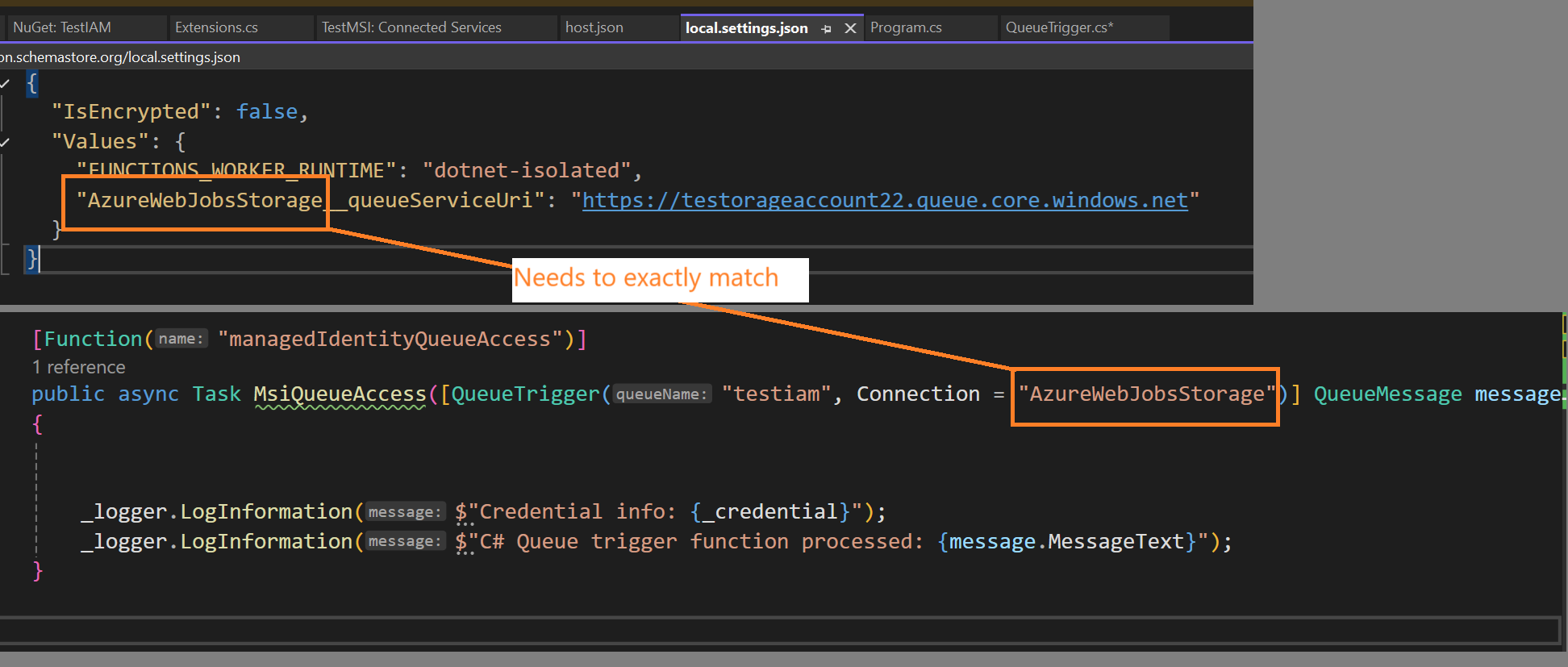
<p>Next, the docs say that to configure Azure Functions to use an MSI instead of an environmental variable for connectionString, we simply add a new variable to our <code class="language-plaintext highlighter-rouge">local.settings.json</code> file.</p>

<pre><code class="language-local.settings.json">{
  "IsEncrypted": false,
  "Values": {
    "FUNCTIONS_WORKER_RUNTIME": "dotnet-isolated",
    "AzureWebJobsStorage__queueServiceUri": "https://testorageaccount22.queue.core.windows.net/testiam"
  }
}
</code></pre>

<p>I added the <code class="language-plaintext highlighter-rouge">AzureWebJobsStorage__queueServiceUri</code> value, this is just set to the storage account I am using.  According to the docs, when you’re using Azure Function Extensions v5 or higher, setting this config value instructs the Azure Function runtime to try and connect using a MSI.</p>

<blockquote>
  <p>To me, this is extremely non-intuitive and very confusing, but that’s how it’s done right now.</p>
</blockquote>

<p>Next, I updated the signature of my function to be sure it is referencing the value from my settings file.</p>

<pre><code class="language-c-sharp">//from 
//public void Run([QueueTrigger("testiam2", Connection = "connectionString")] QueueMessage message)

//to
public async Task MsiQueueAccess([QueueTrigger("testiam", Connection = "AzureWebJobsStorage")] QueueMessage message)

</code></pre>

<p>Note how the Connection contains ‘AzureWebJobsStorage’, while the same settings prefix is found in the <code class="language-plaintext highlighter-rouge">json</code> file as well.  That specific value is what triggers the new MSI features.</p>

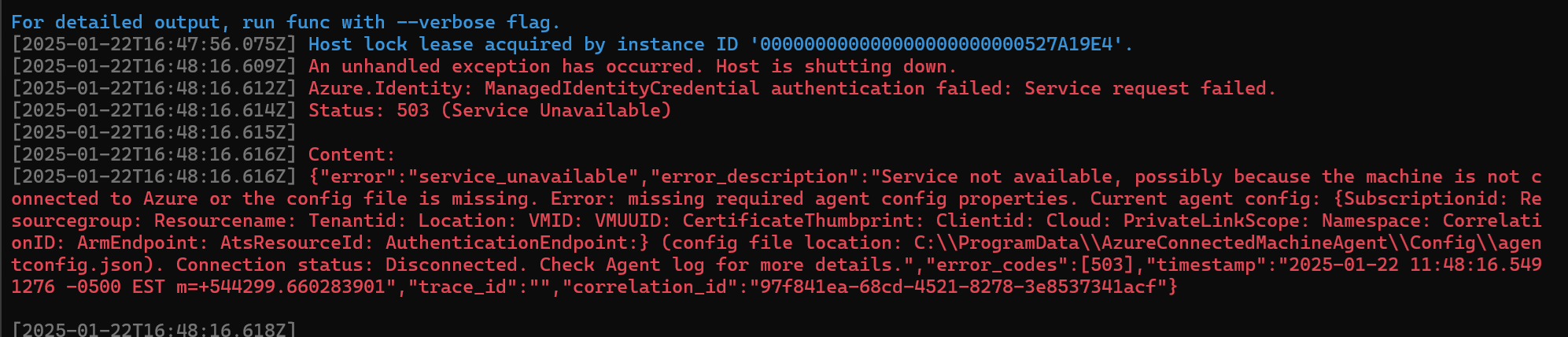
<p>So let’s see what happens when I fire it up!</p>

<p><img src="../assets/images/2025/fails on startup.png" alt="alt text" /></p>

<div class="language-plaintext highlighter-rouge"><div class="highlight"><pre class="highlight"><code>Host lock lease acquired by instance ID '000000000000000000000000527A19E4'.
[2025-01-22T16:48:16.609Z] An unhandled exception has occurred. Host is shutting down.
[2025-01-22T16:48:16.612Z] Azure.Identity: ManagedIdentityCredential authentication failed: Service request failed.
[2025-01-22T16:48:16.614Z] Status: 503 (Service Unavailable)
[2025-01-22T16:48:16.615Z]
[2025-01-22T16:48:16.616Z] Content:
[2025-01-22T16:48:16.616Z] {"error":"service_unavailable","error_description":"Service not available, possibly because the machine is not connected to Azure or the config file is missing. Error: missing required agent config properties. Current agent config: {Subscriptionid: Resourcegroup: Resourcename: Tenantid: Location: VMID: VMUUID: CertificateThumbprint: Clientid: Cloud: PrivateLinkScope: Namespace: CorrelationID: ArmEndpoint: AtsResourceId: AuthenticationEndpoint:} (config file location: C:\\ProgramData\\AzureConnectedMachineAgent\\Config\\agentconfig.json). Connection status: Disconnected. Check Agent log for more details.","error_codes":[503],"timestamp":"2025-01-22 11:48:16.5491276 -0500 EST m=+544299.660283901","trace_id":"","correlation_id":"97f841ea-68cd-4521-8278-3e8537341acf"}
</code></pre></div></div>

<h3 id="do-i-even-have-a-managed-identity-yet">Do I even have a Managed Identity Yet?</h3>

<p>Hmm, that does not look like success.  I noticed that the Subscription, Rg and all of those fields are all empty, likely because my dev laptop does not have an MSI on it.  I was assuming this would be smart enough to try and use the same flow as DefaultAzureCredential, but I guess not.</p>

<p>So let’s instead enroll my machine in ARC to see what happens when there is an MSI associated…</p>

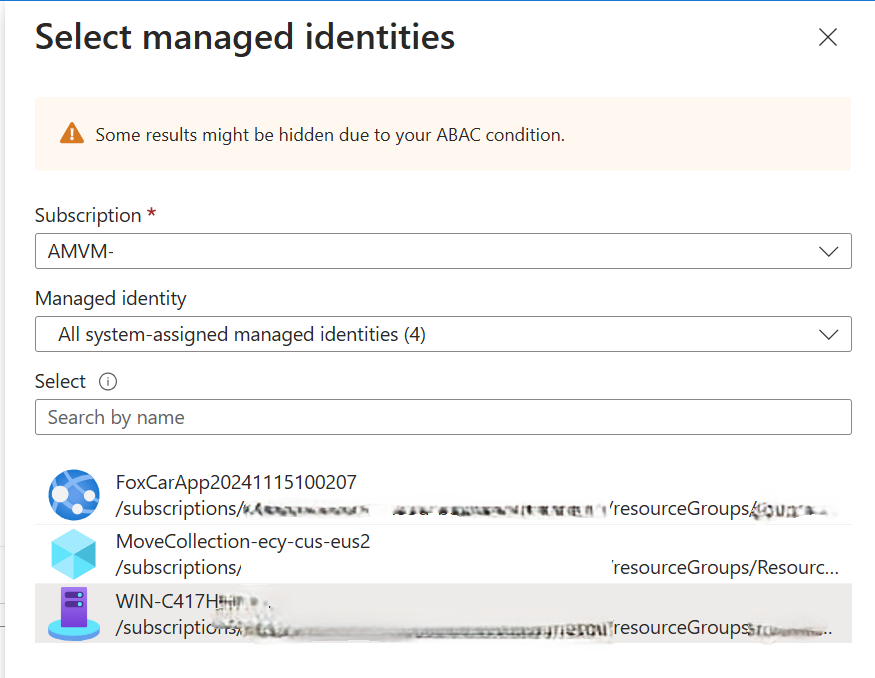
<p>With that done I can now view the resource in Azure and see the Managed Identity which was created for me.</p>

<p>You can view the MSI created for an Arc device by looking at the ‘Resource JSON view’, and see it’s GUID.</p>

<p><img src="../assets/images/2025/arcManagedIdentity.png" alt="alt text" /></p>

<p>Now, to go to my storage account and give this identity (which Helpfully I can assign just by the name of the machine, not the guid displayed) some permissions to interact with the storage account.</p>

<p>I assigned it ‘Storage Blob Data Owner’ perms and then restarted the app.</p>

<p><img src="../assets/images/2025/addMsi-StorageBlobDataOwnerPerm.png" alt="alt text" /></p>

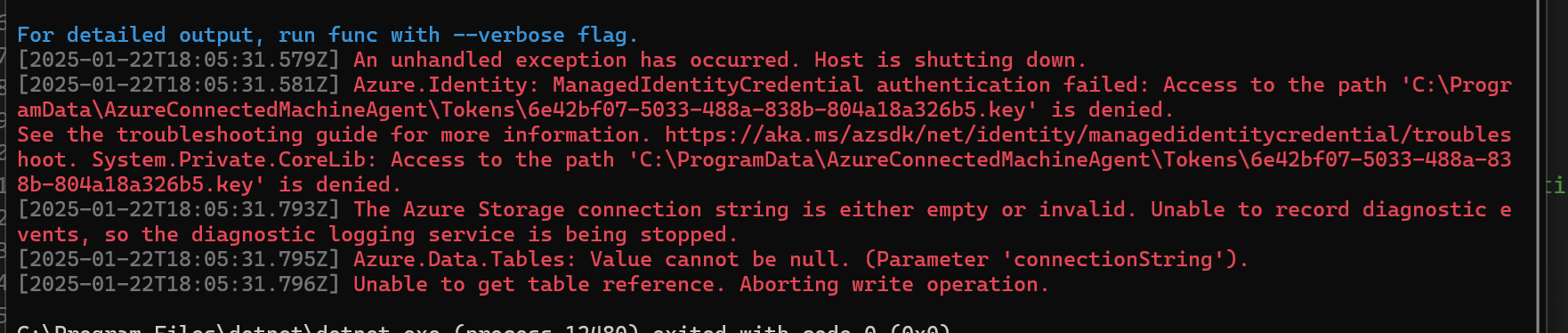
<p>Now I have a different problem, instead of an error saying that I don’t have an Managed Identity, I get this error that I can’t access the Tokens directory.</p>

<p><img src="../assets/images/2025/addPermsToReadKeys.png" alt="alt text" /></p>

<p>To fix this, I navigated to the directory and gave myself owner rights (suitable for debugging, and not needed in prod when this is deployed to a <em>real worker</em> with a <em>real MSI</em>).</p>

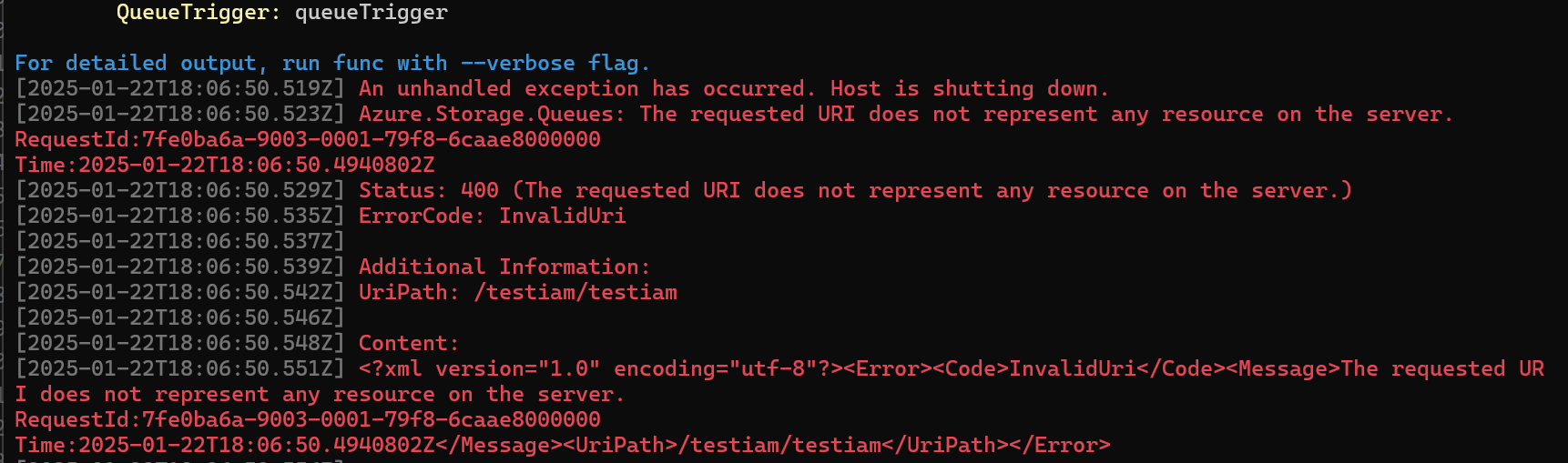
<p>And now a different error.  The storage account does not exist?</p>

<p><img src="../assets/images/2025/theUriDoesNotRepresent.png" alt="error message says 'Azure.Storage.Queues: the requested URI does not represent any resource on the server'" /></p>

<p>OH I had the format of the URL incorrect, it should not include the name of the queue as I had done.</p>

<div class="language-plaintext highlighter-rouge"><div class="highlight"><pre class="highlight"><code>Before
    "AzureWebJobsStorage__queueServiceUri": "https://testorageaccount22.queue.core.windows.net/testiam"

After
    "AzureWebJobsStorage__queueServiceUri": "https://testorageaccount22.queue.core.windows.net/"
</code></pre></div></div>
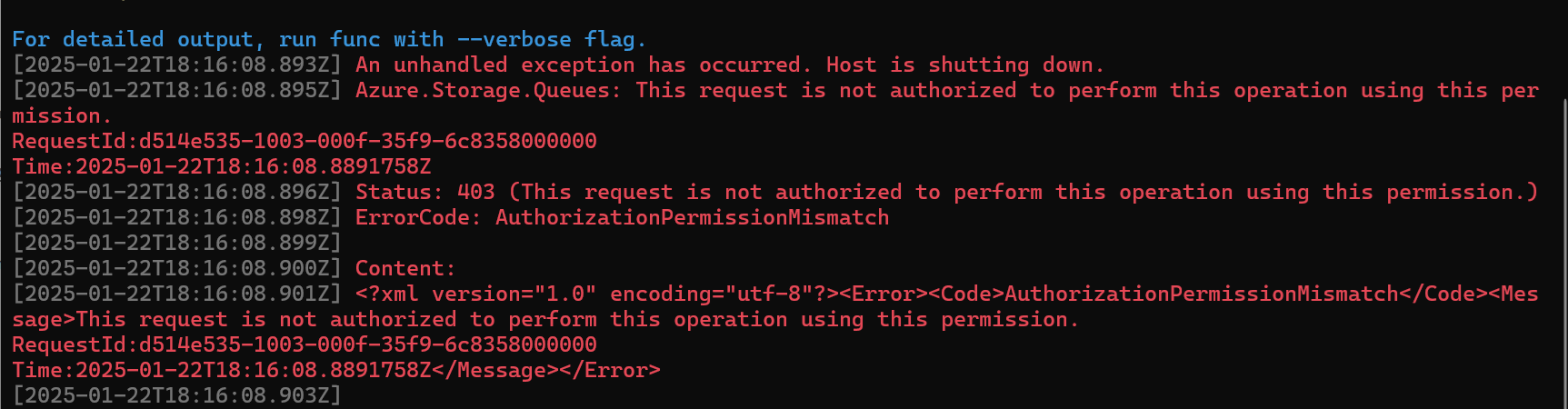
<p>And now to restart once more…and now a new error!</p>

<p><img src="../assets/images/2025/permissionsMismatch.png" alt="error code: AuthorizationPermissionMismatch, the request is not authorized to perform this operation using this permission" /></p>

<p>I thought about it and realized I granted Azure Blob Storage Data owner perms but don’t recall doing anything related to queues, so lets try adding that too.  I specifically added the <code class="language-plaintext highlighter-rouge">Azure Queue Storage Contributor</code> role this time and when I fire it up….</p>

<p>Success!
<img src="../assets/images/2025/success.png" alt="alt text" /></p>

<h2 id="quick-takeaways">Quick Takeaways</h2>
<p>The big takeaways here are:</p>

<ul>
  <li>It IS possible to test Managed Identities on a normal dev machine or laptop, you’ll just need to enroll the machine in Arc to assign a managed identity</li>
  <li>You can use the automatic System Assigned MSI for your machine or any user created MSI</li>
  <li>You will need to assign these permissions to the Managed Identity</li>
  <li>
    <ul>
      <li>Subscription Reader for the sub holding the Storage Account</li>
    </ul>
  </li>
  <li>
    <ul>
      <li>Storage Data Owner permission for the Storage Account</li>
    </ul>
  </li>
  <li>
    <ul>
      <li>Storage Queue / Table / Blob Contributor for the Storage Account</li>
    </ul>
  </li>
  <li>When assigning to Prod, instead use User Assigned Managed Identities so one MSI can be shared on your prod devices within a region, for ease of management</li>
</ul>

<p>Some other weird takeaways is that all of this is configured using appSettings.json files, and namely some properties with very unintuitive names, like <code class="language-plaintext highlighter-rouge">AzureWebJobsStorage_StorageAccountUri</code>. To me, this feels like something that will likely change in a future release, so I would keep my eyes on this area.</p>

<h2 id="tldr">TLDR</h2>

<p>The three  most important things are:</p>
<ul>
  <li>be sure you upgrade to Extensions version 5 or higher</li>
  <li>change your Queue Triggers Connection parameter to match the <em>prefix</em> of the setting in your json file (see example image below)</li>
  <li>go to your <code class="language-plaintext highlighter-rouge">local.setttings.json</code> file and add a setting of <code class="language-plaintext highlighter-rouge">prefix___queueServiceUri</code> for queues, or the other values for other types of Azure Storage based triggers</li>
</ul>

<table>
  <thead>
    <tr>
      <th>Service Type</th>
      <th>Value</th>
    </tr>
  </thead>
  <tbody>
    <tr>
      <td>Azure Blob Service</td>
      <td>AzureWebJobsStorage__blobServiceUri</td>
    </tr>
    <tr>
      <td>Azure Queues</td>
      <td>AzureWebJobsStorage__queueServiceUri</td>
    </tr>
    <tr>
      <td>Azure SQL Tables</td>
      <td>AzureWebJobsStorage__tableServiceUri</td>
    </tr>
  </tbody>
</table>

<h2 id="wait-prefix-what">Wait, prefix what?</h2>

<p>I know, I know, this stuff was rather hard for me to understand too and took a half a day to figure it out.</p>

<p><img src="../assets/images/2025/tldr.png" alt="alt text" /></p>]]></content><author><name>Stephen Owen</name></author><category term="programming" /><category term="AzureFunctions" /><category term="ManagedIdentity" /><summary type="html"><![CDATA[Recently I came upon the need to harden how some Azure Functions were setup. Specifically, they were Azure Functions setup to fire and run some c# code when a message was dropped into a message queue. They worked great, but we would much rather use the security of a Managed Identity to connect, instead using of using a connection string. This guide will cover migrating a function over to using a managed identity AND also how to do this on local dev]]></summary></entry><entry><title type="html">KQL Quickie - Human Readable day of the week</title><link href="/blog/kql-quickie-human-readable-day-of-week.html" rel="alternate" type="text/html" title="KQL Quickie - Human Readable day of the week" /><published>2024-07-17T00:00:00+00:00</published><updated>2024-07-17T00:00:00+00:00</updated><id>/blog/kql-quickie-human-readable-day-of-week</id><content type="html" xml:base="/blog/kql-quickie-human-readable-day-of-week.html"><![CDATA[<p>Ever need to figure out which day of the week something happened, and you’re using an r or ADX like querying language?</p>

<p>Many of these offer a <code class="language-plaintext highlighter-rouge">dayofweek</code> function, but in many cases, these will give you a timespan interval since the previous Sunday.  I don’t know about you, but for me, it’s very hard to just look at <code class="language-plaintext highlighter-rouge">1.00:00:00</code> and think “Oh yeah thats a Monday!</p>

<p><img src="\assets\images\2024\kqlHumanReadable.webp" alt="Header for this post, reads 'Handing off variables in ADO'" /></p>

<h2 id="the-query">The query</h2>

<p>Here is, short and sweet.</p>

<pre><code class="language-kql">let weekday = (day:int) {        
        case(
        day == time(1.00:00:00), "Mon",
        day == time(2.00:00:00), "Tue",
        day == time(3.00:00:00), "Wed",
        day == time(4.00:00:00), "Thu",
        day == time(5.00:00:00), "Fri",
        day == time(6.00:00:00), "Sat",
        "Sun")
    };
    print weekday(1d);   
</code></pre>

<p>Result:</p>

<blockquote>
  <p>Mon</p>
</blockquote>

<p>And a full working example</p>

<pre><code class="language-kql">let weekday = (day:int) {        
        case(
        day == time(1.00:00:00), "Mon",
        day == time(2.00:00:00), "Tue",
        day == time(3.00:00:00), "Wed",
        day == time(4.00:00:00), "Thu",
        day == time(5.00:00:00), "Fri",
        day == time(6.00:00:00), "Sat",
        "Sun")
    };    
   range input from 0d to -6d step -1d
   | extend AsDate = ago(input)
   | extend AsWeekDayInt = dayofweek(AsDate)
   | extend AsDayOfWeek = weekday(AsWeekDayInt)
</code></pre>

<p>Result:</p>

<p><img src="\assets\images\2024\weekDayResults.png" alt="Header for this post, reads 'Handing off variables in ADO'" /></p>]]></content><author><name>Stephen Owen</name></author><category term="querying" /><category term="queries" /><category term="kusto" /><summary type="html"><![CDATA[Have you ever needed to do complex automation in Azure Devops? Like retrieving a token for one service and handing it off to subsequent commands to use? Then you might have been puzzled about the correct syntax to use. In this post, I'll give you a working example of how the syntax should be used to hand variables between bash and PowerShell tasks in Azure Devops]]></summary></entry><entry><title type="html">Solved! Missing mouse or trackpad on LG Laptops</title><link href="/blog/solved-missing-mouse-or-trackpad-on-lg-laptops.html" rel="alternate" type="text/html" title="Solved! Missing mouse or trackpad on LG Laptops" /><published>2024-07-17T00:00:00+00:00</published><updated>2024-07-17T00:00:00+00:00</updated><id>/blog/solved-missing-mouse-or-trackpad-on-lg-laptops</id><content type="html" xml:base="/blog/solved-missing-mouse-or-trackpad-on-lg-laptops.html"><![CDATA[<p><img src="\assets\images\2024\MissingMouse.png" alt="Header for this post, reads 'Handing off variables in ADO'" /></p>
<h2 id="but-first-a-rant">But first, a rant</h2>

<p>LG, Do better.</p>

<p>It’s not enough that the hardware is all controlled by an extremely lagging always running control center app, but troubleshooting it becomes a nightmare, as LG does not bother to write any TSGs or per device guidance.</p>

<p>LG does not publish drivers either, so if you’re looking to deploy en masse, you’ll have to do the nasty of capturing reference drivers from a machine, so expect very tedious imaging as you build the needed drivers.</p>

<p>You also <em>do need</em> to include the control center software too, or risk users ending up in this scenario I encountered.</p>

<p>The user plugged their LG Gram into their husband’s docking station with external monitors on a thunderbolt dock.</p>

<p>When an external mouse is connected in such a manner, the touchpad is disabled for unknown reasons.</p>

<p>The laptop went to sleep and was disconnected from the dock.  This left the user with no way to re-enable their touchpad, although at least the touchscreen still functioned.</p>

<h2 id="the-fix">The fix</h2>
<p>To fix this, look at Device Manager, in this scenario there was <strong>no HID Driver Compliant Touchpad Driver</strong> present on the device.</p>

<p><img src="\assets\images\2024\OIP.jpg" alt="Header for this post, reads 'Handing off variables in ADO'" /></p>

<p>There was however a Device which failed to start, called ‘I2C HID Device’ or something like that.  In our scenario, we uninstalled this device and then restarted the laptop.</p>

<p>On reboot, the device worked again.</p>]]></content><author><name>Stephen Owen</name></author><category term="troubleshooting" /><summary type="html"><![CDATA[Have you ever needed to do complex automation in Azure Devops? Like retrieving a token for one service and handing it off to subsequent commands to use? Then you might have been puzzled about the correct syntax to use. In this post, I'll give you a working example of how the syntax should be used to hand variables between bash and PowerShell tasks in Azure Devops]]></summary></entry></feed>